> Platforms with TR Integration > Unity Development > Debugging Embedded Mode
Debugging Embedded and P2P modes in Unity
Overview
This chapter deals with debugging Peer to Peer and Embedded versions of Unity based games.
The first step is to ensure full exceptions with stacktrace have been enabled.
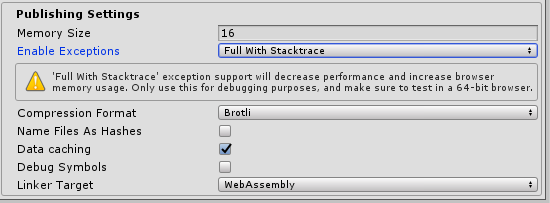
The next step is using the Android Debug Bridge on a device that has USB debugging enabled to show verbose logs. A more in-depth guide on that can be found using the Android Developer Documents.
The verbose logs can be a bit confusing, as they will display all network messages sent from the device. These include:
- Thumbstick inputs
- Button inputs
- Polling the backend, to check if peers have joined the session (host device)
An example of an exception caught by the debugger can be as follows:
11-23 14:32:57.536 6136 6136 I chromium: [INFO:CONSOLE(1087)] "NullReferenceException: A null value was found where an object instance was required.", source: http://192.168.1.169:8000/game/Build/UnityLoader.js (1087)