Actions and Functions in the TR Designer
Overview
This section covers several Lua based functions and actions performed withing the Table Realms Designer, along with a brief description of what they do and how to implement them. Please note, this section is a work in progress, and any suggestions can be submitted to the Table Realms forums.
Send Action:
SendAction(model.id .. ".StartGame")
This function is used to send actions to the host device. The actions fire events differently according to the platform you are using to develop your game.
PlayCanvas
In order for it to operate correctly, there needs to be a matching action on the TableRealmsPlayerActionBehavior object. For the “StartGame” action, the matching action would be:
public void StartGame() {}
Construct2/3
Actions in Construct work differently to other develoment platforms. When using construct, you need to create an event block that receives the command and interprets the instruction. It would look similar to this:
| Object for Event | Condition | Parameters | Object for Action | Action | Parameters |
|---|---|---|---|---|---|
| Table Realms | Action executed named | “start” | Table Realms | send command | “gameStarted”=“” |
| Table Realms | Command Received named | “gameStarted” | TableRealms | Set String | “page”=“Game” |
SendAction can be called from the lua or in the script field on a button, displayed in the image below.
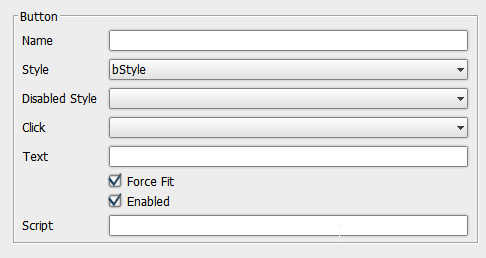
The script field on a button can also call a function in the Lua, such as start().
Checking for Model Changes:
To check if the model changed we need to perform the following actions:
- First we need to set up a local table seperate of the model:
gameData={}

gameData.thing=""
- Second, write a lua function that performs the check:
function CheckModelChanged()

    if gameData.thing~=model.thing then

        gameData.thing=model.thing

        DoStuff()

    end

end
- Thirdly, add a listener to the model associated to a specific key. This listener will update when the value associated with the key is changed.
AddModelListener("leader.0.id", function(key, value) LeaderChanged(key, value, 1) end)
- Alternatively, add a tick hook for the function being called:
AddTickHook(CheckModelChanged)
Set things into the model the same way as they are set into the gameData above.
Note: The model is a Lua table that contains all the relevant data for both the game and players. It is shared between players.
The Players.lua package introduces new functions to assist with player management by listening to changes to model.players, and then breaking those changes into players leaving and joining the game. Calling callbacks for each event.
AddPlayersAddedListener(function(playerId)
    print("Added Player:" .. playerId)
end
)
AddPlayersRemovedListener(function(playerId)
    print("Removed Player:" .. playerId)
end
)
Accessing and Mutating Named Components
In order for the values of named components to be “get” and “set”, at least one of the components on a page needs to be named. Then, the following actions can be performed:
- The named component can be accessed via
"components.[name]"in Lua. - The components’ individual parts can be accessed and mutated via
components.[name].text = "abc123"
General Lua Environment Actions and Lua Functions:
In Lua, you can talk to the environment to perform actions such as:
- Closing the game:
environment:Close() - Ending the host session:
environment:EndHostSession() - Save out model values:
environment:SetOnlineModelKeys({"MySoloHighScore","MyTeamHighScore"})
A function to assist with splitting strings string.split can be used as follows:
local str="Items,More,OtherThings"

local items=string.split(str,',')

print(table.tostring(items))

-- output

{
    "Items",
    "More",
    "OtherThings"
}